fastlane
fastlane
- 用于配置
iOS和Android的持续集成的神器 Fastlane是一套工具,帮助你简化和自动化 App 发布或部署的过程,将之变成一条平直的工作流Fastlane是用Ruby语言编写的一套自动化工具集和框架,每一个工具实际都对应一个Ruby脚本,用来执行某一个特定的任务Fastlane核心框架则允许使用者通过类似配置文件的形式,将不同的工具有机而灵活的结合在一起,从而形成一个个完整的自动化流程Fastlane是一个ruby脚本集合,它可以按照我们指定的路线,在指定位置执行我们所要执行的操作。这里我们称这样的路线为「航道(lane)」,这样的操作称为Action- 到目前为止,
Fastlane的工具集大约包含170多个小工具,基本上涵盖了打包,签名,测试,部署,发布,库管理等等移动开发中涉及到的内容, 工具的描述和使用可参考: Action官方文档和GitHub源码 - 如果这些工具仍然没有符合你需求的,没有关系,得益于
Fastlane本身强大的Action和Plugin机制,如果你恰好懂一些Ruby开发的话,可以很轻易的编写出自己想要的工具
安装
- 确保ruby为最新版本
1
2
 brew update
 brew install ruby
安装
fastlane1
sudo gem install -n /usr/local/bin fastlane
fastlane相关操作命令1 2 3 4 5 6 7 8
// 查看当前fastlane版本 fastlane --version // 查看所有action fastlane actions // fastlane初始化 fastlane init
fastlane 提交私有库
cd 到当前目录, 执行 fastlane init 命令
但是对于提交私有库来说这个过程会创建一些无用的文件, 包括双穿需要的 appleID 等, 有时我们不涉及这些, 所以我们还可以直接创建所需文件
1
2
3
4
5
6
7
8
9
10
cd 根目录

// 创建一个fastlane文件夹
mkdir fastlane

// 进入fastlane目录
cd xxx/xxx/fastlane

// 创建一个Fastfile文件
touch Fastfile
接下来就是编写Fastfile文件内容
配置 Fastfile 文件
语法解析
fastlane init创建好文件后, 打开Fastfile文件, 默认内容如下
1
2
3
4
5
6
7
8
default_platform(:ios)

platform :ios do
  desc "Description of what the lane does"
  lane :custom_lane do
    # add actions here: https://docs.fastlane.tools/actions
  end
end
platform: 使用的平台desc: 描述航道的作用lane: 命名航道名称和相关Actioncustom_lane: 即为航道名称, 可自定义- 如需外界传递参数, 可在
do后面添加|options|
接受外界传递参数, 在添加
options后, 可定义如下参数1
tagName = options[:tag]
外部使用命令是, 即可通过xxx tag: 0.0.1 进行传值
fastlane 文件
- Fastfile文件的作用就是把正常使用的命令转成fastlane的语法, 并在该文件中执行, 可在官方文档中查找对应的语法
- 以==提交私有库到远程==为例, 就是把所有相关命令, 找到对应的fastlane命令写在Fastfile文件中执行
fastlane 文件配置
提交私有库时, 需要执行的命令如下
1
2
3
4
5
6
7
8
9
10
11
12
13
14
15
16
17
18
19
20
21
22
23
24
// 将本地库更像到测试项目
pod install

// 将本地代码加入本地仓库里
git add .

// 提交修改到本地仓库
git commit -m '你的修改记录'

// 添加名称为origin的远程连接
git remote add origin '你的github项目地址'

// 在push之前, 查看spec是否配置有问题
// 验证本地spec文件是否有误
pod lib lint

// 推送master分支的代码到名称为origin的远程仓库
git push origin master

// 设置tag值
git tag "0.0.1"

// 上传提交tag
git push --tags
- 打开官方文档搜搜索
- 例如: 搜索pod install, 对应的即为cocoapods, 如下
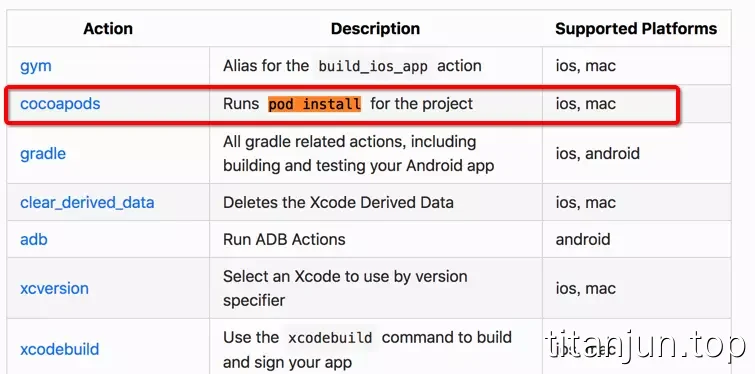
编写的 Fastfile 文件配置内容如下, 可做响应的参考
1
2
3
4
5
6
7
8
9
10
11
12
13
14
15
16
17
18
19
20
21
22
23
24
25
26
27
28
29
30
31
32
33
34
35
36
37
38
39
40
41
42
43
44
45
46
47
48
49
50
51
52
53
54
55
56
57
58
59
60
61
62
default_platform(:ios)

platform :ios do
  desc "用于对私有库的升级维护和提交"
  lane :DownloadLane do |options|

    # 0. 需要外界传入的参数
    tagName = options[:tag]
	targetName = options[:target]


  	# 1. 将本地库更像到测试项目
	# pod install
	cocoapods(
  		clean: true,
  		# 该目录为执行Podfile未见的相对路径
  		podfile: "./Example/Podfile"
	)

	# 2. 将本地代码加入本地仓库里
	# git add .
	# path为需要提交的文件的路径, 这里是所有文件
	git_add(path: ".")

	# 3. 提交修改到本地仓库
	# git commit -m '你的修改记录'
	# message: 提交信息
	git_commit(path: ".", message: "这里是提交信息")

	# 4. 在push之前, 查看spec是否配置有问题
	#  验证本地spec文件是否有误
	# pod lib lint
	# allow_warnings: 允许警告的存在
	pod_lib_lint(allow_warnings: true)

	# 5. 推送master分支的代码到名称为origin的远程仓库
	# git push origin master
	push_to_git_remote  # 更多的信息可查看官网

    # 6. 判断标签是否存在, 重复添加标签会报错
	# if-else-end和if-end判断语句
	if git_tag_exists(tag: tagName)
		# UI.message: 打印信息
    	UI.message("发现tag:#{tagName} 该标签已经存在")
	end

	# 7. 设置tag值
	# git tag "0.0.1"
	add_git_tag(
		tag: tagName
	)

	# 8. 上传提交tag
	# git push --tags
	push_git_tags

	# 9. 更新索引库
	# pod repo push XXXX xxx.podspec
	pod_push(path: "#{targetName}.podspec", repo: "TitanjunSpec", allow_warnings: true)

  end
end
- Fastfile文件编写完成, 需要检测文件语法是否有误, cd 进入根目录, 执行 fastlane lanes
- 如果没问题, 执行命令 fastlane 航道名称 参数1:值1 参数2:值2
- 示例: fastlane DownloadLane tag:0.1.0 target:TKDownLoad
- 正常情况下, 私有库已经被提交到远程仓库了, 并更新了对应的索引库
fastlane自动化打包并上传蒲公英
设置fastlane
1
2
cd 项目主目录
fastlane init
会出现选择,选择 4 手动管理,执行完毕后目录下多了 fastlane目录 和 Gemfile,会卡住,其实已经完成了,control+C 取消,再执行一次
配置 Appfile文件 和 Fastfile 文件
配置这两个文件之前,先安装一下蒲公英插件,我这里用到自动上传ipa到蒲公英。
1
fastlane add_plugin pgyer
输入 y 继续,后续可能需要输入sudo密码进行安装。
打开 Appfile 文件,添加 app_identifier 和 apple_id,app_identifier 就是你的 APP 的 Bundle identifier,apple_id 是你的开发者账号。
1
2
app_identifier "com.app.app"
apple_id "developer@app.com"
配置fastlane文件:
1
2
3
4
5
6
7
8
9
10
11
12
13
14
15
16
17
18
19
20
21
22
23
24
25
26
default_platform(:ios)

platform :ios do
  desc "自动打包ipa上传到蒲公英"
  # APPEP名可以更改,最后用来执行命令需要用到;
  lane :APPEP do
    # add actions here: https://docs.fastlane.tools/actions

    gym(
        clean:true,
        # MyAPP是你的项目名称,而不是APP名称;
        scheme:"MyAPP",
        configuration:"Release",
        # enterprise是打包的方式,我这里打的企业包,还有appstore, ad-hoc, package, enterprise, development, developer-id;
        export_method:"enterprise",
        # 这里是导出打包路径;
        output_directory:"/Users/kyson/Desktop/APP",
    )

    # 蒲公英的api_key;
    # 蒲公英的user_key;
    # 蒲公英的api更新描述;
    pgyer(api_key: "", user_key: "", update_description: "")

  end
end
执行自动打包
1
fastlane APPEP
本文由作者按照 CC BY 4.0 进行授权